
You’ll need to follow a few simple steps to connect your Fitbit account to MyDataHelps if you want to view your data or if a study project requires you to connect your Fitbit account.. This guide walks you through everything you need to get started.
What You’ll Need
- A Fitbit device
- A Fitbit account
- The MyDataHelps app installed on your phone or access to https://mydatahelps.org
If you don’t already have a Fitbit account, you can create one during the connection process.
Step 1: Make sure your Fitbit device is set up
Before connecting to MyDataHelps, make sure your Fitbit device is paired with your Fitbit account in the Fitbit app.
To check:
- Open the Fitbit app on your phone.
- Tap your profile icon in the top left corner.
- Make sure your Fitbit device is listed and connected.
- If your device is not connected, follow the prompts in the Fitbit app to set it up.
If you’ve used Fitbit in the past or created more than one account, there may be multiple Fitbit accounts or devices associated with your email. This can cause issues during connection. To learn how to check which account or device is currently connected, refer to our Troubleshooting Fitbit Connection Issues article.
Step 2: Connect Fitbit to MyDataHelps
Once your Fitbit is paired to your Fitbit account, follow these steps to connect it to MyDataHelps:
- Open the MyDataHelps app.
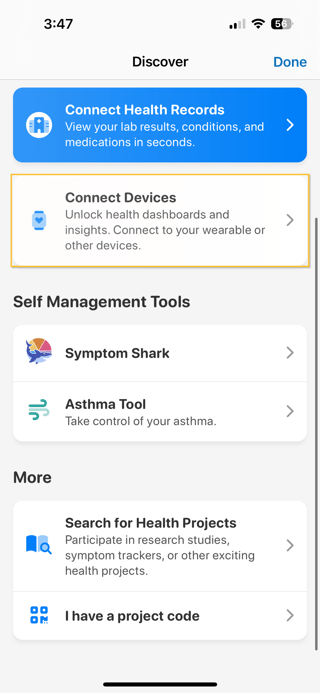
- Tap the ☰ menu (top, right corner), then tap “Discover”.
- Tap “Connect Devices”.
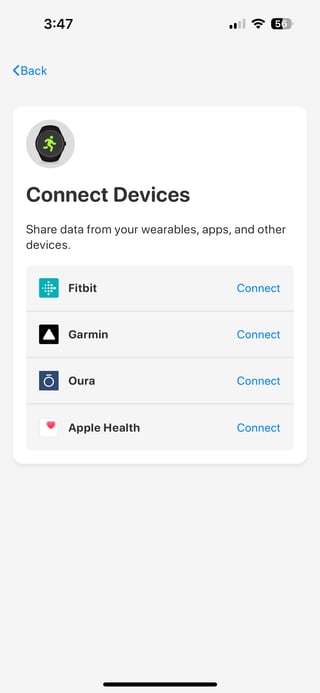
- Tap “Connect” next to Fitbit.
- Choose how you log into Fitbit:
If you created your account with a Google login, tap Continue with Google.
If you have an older Fitbit account, log in with the Fitbit account.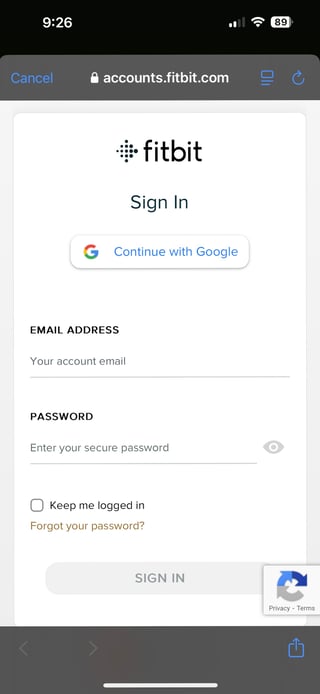
- When prompted, select “Allow All” to ensure the correct data is shared with MyDataHelps.
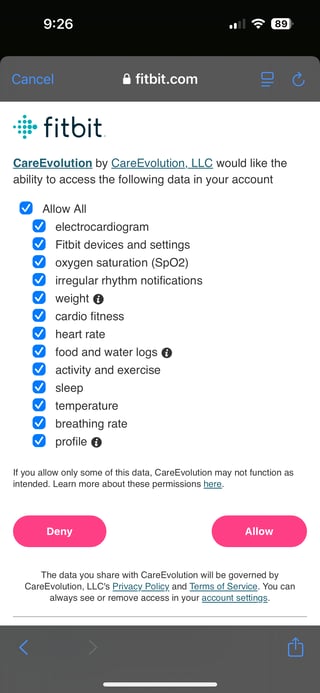
- Once you return to the app and see Connected next to Fitbit, your setup is complete! Fitbit data will now be sent automatically to MyDataHelps.
Sometimes, Fitbit may lose connection with MyDataHelps if your login token expires or your account changes. If your data stops syncing or you're asked to reconnect, check out our Troubleshooting Fitbit Connection Issues article for help.